
How to actually use Profile Objects in Business Central


To 'Whomsoever This May Concern',

  • When I was working on a Production Deployment for one of my clients, I noticed that I could not create a Profile in Business Central Production Tenant. I was able to create new Profile in Sandbox.


  • Then I tried using configuration Package and modify the contents of 2000000178 Profile Table and as always configuration package blocked it.


  • There was no way of dealing with this other than contacting Microsoft Support and this is the answer I get from a Support Engineer


  • After being a little creative, I figured out that developing profile objects might help.
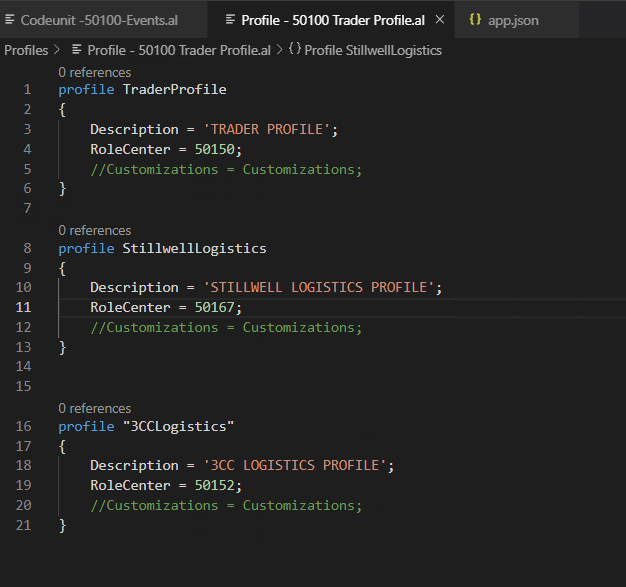

  • And this resolved this issue for me.


Comments

Popular posts from this blog

Something went wrong. An Error occurred - Error Resolution

Introduction: With the installation of NAV 2018 or BC On-premise, I have observed that when creating New Server Instance and New WebServer Instance, you will get the error 'Something went wrong. An Error occurred '. I referred to the community questions below but didn't find my resolution. Hence, I decided to write this blog. Pre-requisites: Microsoft Dynamics Business Central - On-Premise / NAV 2018 Understanding of Business Central Authentication  Books & References: https://community.dynamics.com/nav/f/microsoft-dynamics-nav-forum/261301/nav-2018-web-client-an-error-has-occurred https://community.dynamics.com/business/f/dynamics-365-business-central-forum/421987/error-something-went-wrong-an-error-has-occurred-azure-ad-tenant Demonstration: 1. Creation of NAVServerInstance: In order to create NAVServerInstance, you can either add the Server Instance through Business Central Administration or Powershell command. Add Instance - Business Central Administration Add Insta...

How to resolve 'Edit in Excel' issues

  Introduction: As you know that D365 BC offers Edit in Excel functionality. But manipulating or customizing such a  standard functionality is difficult as there is not much control available. Hence, solving issues is also a difficult task. I will be resolving the issue for this specific issue, however, the debugging steps are similar. Pre- requisites : ODATA V4 Connectivity tool for Webservices Microsoft Dynamics 365 Business Central Books & References: https://community.dynamics.com/business/f/dynamics-365-business-central-forum/448226/issue-with-excel-add-in/ Demonstration: The way Edit in Excel works is that for a given page a Webservice is created adding PageID and Page Name. Hence, there are some Webservice connectivity checks in place to validate. 1. Edit in Excel Custom Action on the page: If you are adding Edit in Excel Action on the page, please ensure that you are providing appropriate PageName and Filter criteria as Webservice is using these parameters Refer Ed...

Business Central On-Premise versions and download links

Business Central On-Premise versions and download links  Hi All, With every new versions of Business Central being released, its difficult to remember the Release Wave and BC versions. Hence, I was looking at the blog from Yun Zhu ( https://yzhums.com/26288/) to download all the older versions of BC On-Premise which seemed like an easier option. Please note that this blog is being copied as is from Yun Zhu's blog with the intent of keeping for internal documentation for future use and making it more accessible by increasing the chances of being found on the internet search. Contents Business Central 2024 release wave 2 (BC25) Business Central 2024 release wave 1 (BC24) Business Central 2023 release wave 2 (BC23) Business Central 2023 release wave 1 (BC22) – End of Life Business Central 2022 release wave 2 (BC21) – End of Life Business Central 2022 release wave 1 (BC20) – End of Life Business Central 2021 release wave 2 (BC19) – End of Life Business Central 2021 release wave 1 ...